
When a homeowner searches for spray foam or insulation nearby, the first thing they often see is a map with a few local businesses, each with a rating, a phone number and photos. That listing comes from your Google Business Profile (GBP). It is free, it is controlled by you, and for a local contractor it is often the first impression you make, before your website loads.
This guide walks through how to claim and set up your profile the right way, what to put in each section, how to handle reviews, photos and posts, what to avoid so the profile is not suspended, and how to tell whether it is bringing in calls.
Why Your Google Business Profile Matters
Google says local results are mainly based on relevance (how well a profile matches the search), distance (how far the business is from the searcher) and prominence (how well known the business is, which can include reviews and links from around the web). Google also notes there is no way to request or pay for a better local ranking. You can read the details in Google's tips to improve your local ranking.

That tells you what to focus on: a complete and accurate profile (relevance), a believable service area (distance), and a real reputation (prominence). Nobody can promise you a spot in the map results. What you can do is remove the mistakes that keep good contractors out of them, and make your listing convincing when it does appear.
A strong profile also does more than rank. People can call you, message you, visit your website or request directions straight from it. It works alongside the rest of your local SEO, and our Google Business Profile service covers setup and ongoing management if you would rather not do it yourself.
Related reading: How to Use Google Posts to Engage Local Customers
Step 1: Claim and Verify Your Profile
- Search for your business on Google. If a profile already exists, claim it instead of creating a duplicate.
- If none exists, create one at the Google Business Profile site using the Google account your business owns. Use an account the company controls, and turn on two-step verification so you do not lose access if an employee leaves.
- Verify the profile. Depending on your business, Google may offer a postcard, phone, email or video verification. Verification is what lets you manage the profile and respond to customers.
Use your real business details. Google's rules do not allow virtual offices or mailboxes at remote locations, and they require that a service-area business with a staffed office actually staff it during business hours. If you work out of a home and travel to jobs, you can hide your address and show a service area instead. Read Google's guidelines for representing your business on Google before you start.
Step 2: Fill Out the Basics Correctly
Business Name
Use your real business name, the one on your signage, invoices and website. Google does not allow unnecessary information in the name, such as keywords, taglines or locations. A name like "Smith Spray Foam | Best Insulation Contractor in Dallas" invites a suspension. Keep it the same everywhere your business is listed.
Categories
Your primary category tells Google what kind of business you are. For most insulation contractors that is Insulation Contractor. Google advises using as few categories as possible to describe your core business, and choosing ones that complete the sentence "this business is a...". Add a secondary category only if it is a real Google option and truly describes what you do, not just to appear in more searches.
Services and Description
Add the services you actually sell, in the words customers use: open-cell spray foam, closed-cell spray foam, attic insulation, crawl space encapsulation, wall insulation, commercial insulation, and so on. In the description (up to 750 characters), say plainly who you serve, where, and what you do. Keep it honest and readable. Links are not allowed in the description.
For example: "We install open-cell and closed-cell spray foam insulation for homes and commercial buildings in [City] and nearby areas, including attics, crawl spaces and walls." Fill in only what is true, such as your years in business or licenses.
Service Area
List the cities and areas you actually serve. Google says service areas should not extend farther than about two hours of driving time from your base in most cases. A realistic list works better than naming every town in the state, and it makes the profile more believable to customers.
Phone, Website and Hours
Use a local number that rings at your business, and keep it identical to the number on your website and other listings. If you use call tracking, keep your main number listed too and check the current Google guidelines. Link to the page that best represents your business, and put correct hours on the profile, including any seasonal changes.
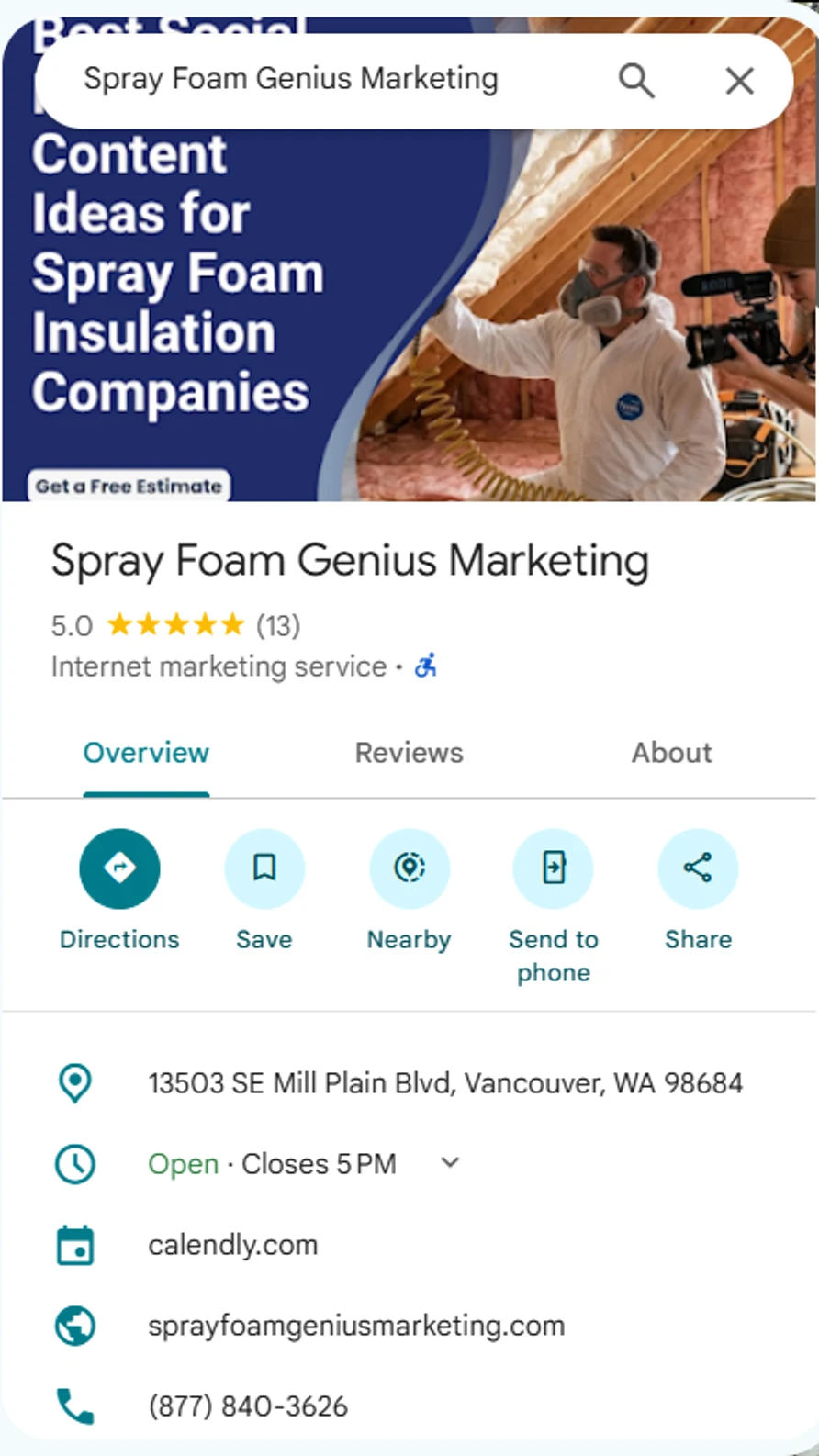
Here is a real, filled-in profile: our own listing as it appears on Google Maps in October 2026. You can see the name, the rating and review count, the category, the address, an opening-hours line, the website and the phone number, plus a post image at the top. Yours should show the same basics, and every one of them should match your website.
Step 3: Photos and Video
Insulation is visual, so use real photos: your crew and trucks, the rig, the foam going on, completed attics and crawl spaces, and before-and-after pairs. Stock photos make a profile look generic. Add new photos regularly instead of in one batch, and make sure each shows real work you did. Short videos of the process or a customer comment can help too, with the customer's permission.
Google's rules cover photos and videos too, so avoid anything with personal information, such as a customer's address or license plate.
Step 4: Reviews
Google says more reviews and positive ratings can help your local ranking, and they influence whether a homeowner calls you or the next company. Build a routine: ask every customer right after the job, text or email a direct review link, and reply to every review.
- Do not offer discounts, gifts or prizes for reviews. Google's policy treats incentivized reviews as rating manipulation and removes them.
- Do not ask only happy customers. Ask everyone.
- Never buy reviews or ask staff or friends to write fake ones. Fake reviews can get a profile suspended.
- Reply calmly to negative reviews, acknowledge the concern, and offer a direct number to fix it offline.
For more, see our guides to Google reviews for spray foam businesses and Google's tips to get more reviews.
Step 5: Posts and Updates
Posts let you share job photos, seasonal tips, offers and news right on your profile. Treat them as a way to show customers your business is active, not as a ranking trick. Good post ideas include a finished attic or crawl space, an explanation of open-cell versus closed-cell foam, a seasonal reminder, and an invitation to call for an estimate. Add a clear call to action to each one. Only advertise offers you really intend to honor.
Step 6: Questions, Messages and Your Website
Put clear answers on your website and keep your profile information complete and your reviews current. Do not post fake questions from another account. If you turn on messaging, reply promptly.
Link your profile to the page that best matches what customers want. If you run several service areas with real offices, send each profile to its own location page with local project photos, local reviews and services offered in that area. Do not use that page to repeat the same text with the city swapped.
If You Serve More Than One Area
Google's guideline is one profile per business location. A service area is not a reason to create new profiles. You can add more cities to the service area of one profile, and a separate profile is for a location where you actually have a staffed presence, such as a real satellite office. Creating profiles for towns where you have no office is the fastest way to get the main profile suspended.
If you do operate real branches, keep the business name identical on each profile, use a local phone number for each, and send each customer to the review link for the branch that did the work, so reviews stay with the right profile.
Mistakes to Avoid
- Keywords or city names added to the business name
- A virtual office, mailbox or fake address
- Too many categories, or categories that do not fit
- Name, address and phone that differ between your profile, website and other listings
- Incentivized or fake reviews, and ignoring real ones
- Stock photos in place of real job photos
- Setting up the profile once and never looking at it again
Measure What the Profile Is Doing
Your profile's performance data shows how people find and use it: searches that led to it, calls, messages, direction requests and website clicks. Check it monthly. Add a tracking tag to your website link so visits from the profile show up in your analytics, and use call tracking if you want to know which calls started there. Look for trends, not single weeks, and compare calls against booked jobs rather than views.
Get a Free Marketing Audit
Want a second set of eyes on your profile? We offer a free marketing audit for insulation and spray foam contractors that covers your profile, reviews and local visibility. Call 877-840-3626 or email info@sprayfoamgeniusmarketing.com.
Frequently Asked Questions
Do you still need a Google Business Profile if you have a website?
Yes. A profile and a website do different jobs. The profile can put your phone number, reviews and photos in front of someone searching nearby, and your website explains your services in depth. They work best when the details match.
Which category should an insulation contractor choose?
For most contractors, the primary category is Insulation Contractor. Add a secondary category only if Google offers one that accurately describes another core service. Google recommends using as few categories as possible.
Can you hide a home address and show a service area instead?
Yes, if you travel to customers and do not serve them at your address, Google lets service-area businesses hide their address and list the areas they serve.
Can you create a profile for every city you serve?
No. Google's guidelines allow a separate profile where you have a real, staffed location. For other towns, add them to the service area of the profile you already have and build a helpful page for each on your website.
Can you offer a discount for a Google review?
No. Google's policy says incentives for reviews are not allowed, and reviews gathered that way can be removed. Ask every customer, make it easy, and respond to each review.
How often should you update your profile?
Add new photos and posts regularly, such as after finished jobs, and check hours, services and reviews at least monthly. Keep it current, because an out-of-date profile makes a business look inactive.
How long until you see results?
It depends on your market, your competition and how complete your profile was to begin with. Nobody can promise a ranking or a timeline. Fix the basics, build a steady flow of reviews and watch your calls and booked jobs over time.
What should you do if your profile is suspended?
Find out why from the notice in your profile, fix the issue, such as an ineligible address or a keyword-stuffed name, and submit a reinstatement request following Google's instructions. Avoid creating a new duplicate profile, which usually makes things worse.
Further Reading
Official guidance from Google on the topics in this article: